Set Bundle Limits (Maximum Items and Quantity)
Control how bundles are built
QVBundle lets you control:
How many total items can be added
How many times the same product can be added
Why limits matter
Limits help you:
Protect margins
Prevent abuse
Keep bundles balanced
Step 1 – Open QVBundle settings
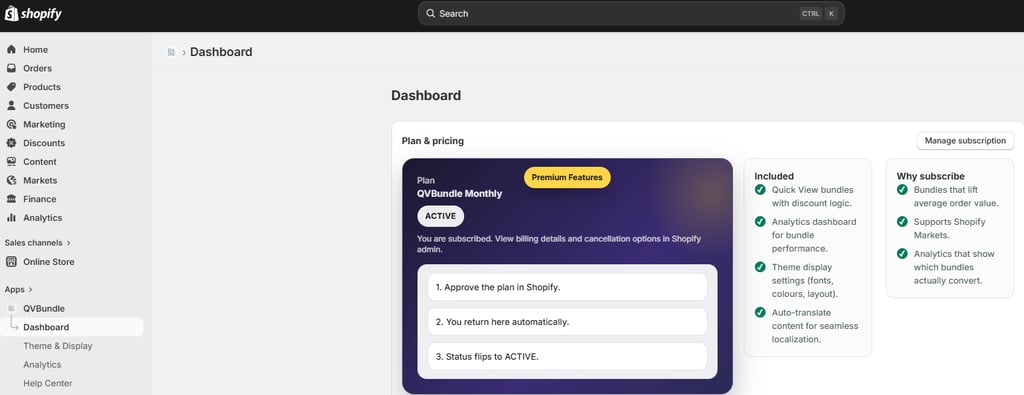
Open the QVBundle app in Shopify admin.
Step 2 – Set maximum bundle items
Select the Theme & Display page in the left navigation bar. Choose the Limits option.
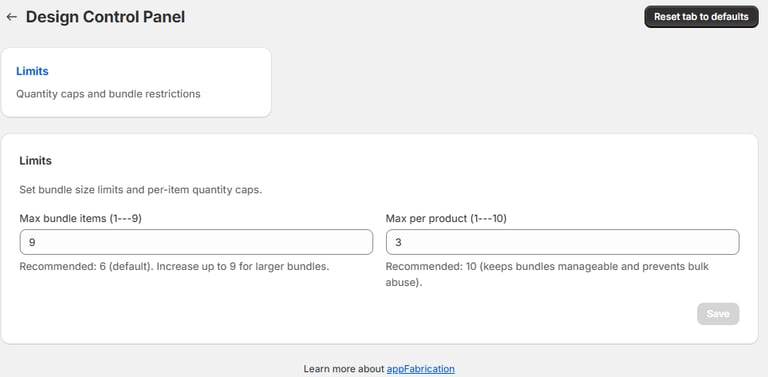
Choose how many total items a customer can add to a bundle.
Step 3 – Set max quantity per product
Choose how many times the same product can be added.
Step 4 – Save changes
Click Save to apply the limits.
Final result
Customers can only build bundles within the limits you’ve defined.