
One-to-one AI training sessions

Get AI working for your business.

Working out which AI tools to use, what to trust and where they’d help can feel like another job on top of running your own business.

I’m Scott. I co-own a small manufacturing business and build software for it. I’ll help you work out where AI fits in yours and show you how to use it on work you already do. You don’t need a technical background.

For sole traders and small businesses Beginners welcome Online £195 for 90 minutes

Scott, the developer behind appFabrication
ScottDeveloper and co-owner of Dust Shack

See where AI could help in your business.

Pick the problem that sounds most like yours. I’ll show you what we’d set up in a session and what changes afterwards.

“I’m not sure what’s safe to put into it.”

What we’d set up

Your settings checked, and a list of what stays out

We go through the privacy settings on your AI account, such as ChatGPT or Claude, so you know what is kept and whether your chats are used to train the AI. Then we write a list of what you never paste in.

You keep Your account set the way you want it, and your list of what stays out.

The difference

Before the session

You avoid using it for anything that matters, or you paste things in and hope.

After the session

You know what your account keeps, and you have a rule for what stays out.

“I don’t know what I’d use it for.”

What we’d set up

A short list of where to start

Before the session you tell me what takes up your time. I suggest three jobs worth trying, and we set up the first one on real work.

You keep A list of three jobs picked from your week, with the first one set up and tested.

The difference

Before the session

You open it now and then, ask a general question and close it again.

After the session

You have one job it helps with every week, and two more to try next.

“Its answers could be about any business.”

What we’d set up

A short file about your business

We write it in the session: the facts a customer would ask about, such as prices and timings, and how you work. The AI reads it before it answers, so you tell it once and stop re-explaining the business in every chat.

You keep A business file saved in your account, which you can add to.

The difference

You ask“Reply to this customer: ‘How much is it, and how long will it take?’”

Before the session

“Thanks for getting in touch! Our prices start from [insert price] and it usually takes [insert timeframe].”

After the session

“Thanks for getting in touch. Prices start at £65, and it usually takes 5 working days from when you confirm.”

“What it writes sounds like an advert.”

What we’d set up

Your writing rules

We build them from things you have already written, including the words you would never use. The AI is set to use them when it writes for you, and you learn how to correct it when it slips. Bring three things you have written, such as emails or posts.

You keep Writing rules saved in your account.

The difference

You ask“Tell a customer we’re running a week late and it’s our fault. The new date is Friday 14th.”

Before the session

“We sincerely apologise for any inconvenience caused. Rest assured, your satisfaction is our top priority and we are working tirelessly to resolve this.”

After the session

“I’m sorry, we’re running a week late. That’s our fault. The new date is Friday 14th.”

“I can’t tell when it’s making things up.”

What we’d set up

Answers that show where they came from

We set your account up so answers show their source, and you practise opening it and checking. We also list the things you should always check yourself. AI can still get an answer wrong, which is why the checking matters.

You keep Your account set up to show sources, and a list of what you always check yourself.

The difference

You ask“How long do I have to keep my business records?”

Before the session

A confident answer with nothing to check it against.

After the session

An answer with a link to its source, which you open and read before you rely on it.

“I want to build a small app myself.”

What we’d set up

A small app, built the way a developer builds one

A chat window will write you a small app if you ask. The harder part is keeping it working when a price changes or something breaks. Over the three build sessions you build yours the way I build my own:

  • It lives in files you own, on your computer and not inside a chat, so it is still yours if you switch AI tools.
  • Each working version is saved, so a bad change can be undone.
  • A backup copy sits online in your own account, so a lost or broken laptop doesn’t take the app with it.
  • The app has its own project notes: what has been built and what is still to do. The AI reads them before it starts, so months later you can pick up from the notes without starting again.
  • If the app outgrows what you can do, any developer can pick up the files and carry on, including me.

You keep The working app we agreed before you booked, its files, the saved history of every change and its project notes. This takes the three build sessions (£495), not the £195 session. The build sessions don’t include anything that needs logins, payments or stored customer details.

The difference

Before the sessions

Say your idea is a quote builder. Today you work out each quote by hand: the price, any discount, the extras and when it will be ready. Then you type it all into a message.

After the sessions: an example to try

Example: three medium items with delivery come to £216, with a deposit of £108 to confirm.

A quote builder is only one example. Yours depends on the job you want to make easier and the software or website platform you already use. This example has more in it than a first version would.

The first five are examples. In the £195 session we work on one of them, or something similar that you choose, and you keep what we set up. The small app is separate: three build sessions for £495.

The examples are prepared, not live AI. The quote builder runs in your browser, with sample prices and rules.

Apps I’ve built for the businesses I co-own.

At Dust Shack, the manufacturing business I co-own, I’ve had to work out which jobs need a better tool and how to build one people will use. This is the kind of app I build as a project. In the build sessions you make a much smaller one yourself, using the same method.

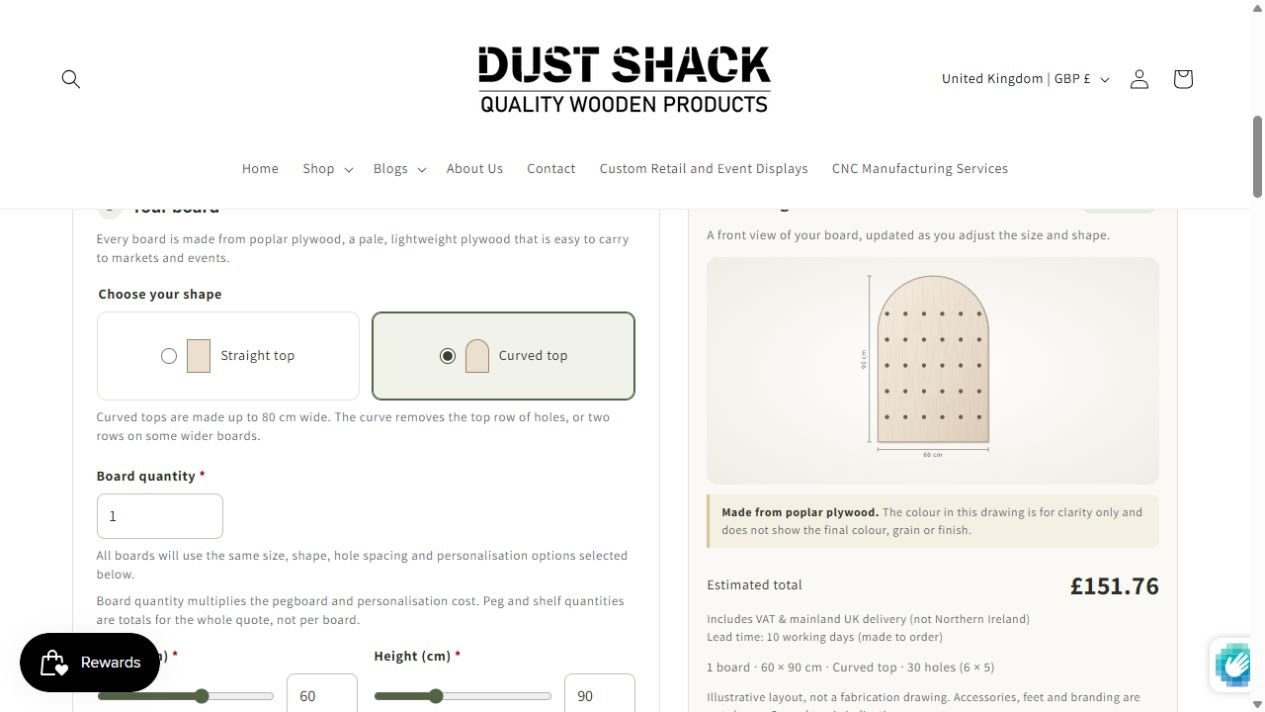
Dust Shack’s pegboard configurator showing shape and size options, a preview and an estimated price
Dust Shack’s pegboard configuratorI built this so customers could choose a shape and size, see a preview and get an estimate.

Two kinds of session.

You’ll work with me on a video call, hands-on in your own account. You keep the instructions and files we put together.

Use AI in your day-to-day work

£195One 90-minute session

Start here if you’re new to AI or want to get more out of the tool you already use. We’ll pick something from your business and set it up in your account, so you keep using it after the session.

  • Set up a project with your business details and instructions.
  • Try it on your own work, with customer details removed.
  • Learn what to check in the result and how to adjust the instructions.

You leave with one of these, depending on what you choose

  • Your account’s privacy settings checked, and a list of what stays out.
  • A business file your AI is set up to read first.
  • Writing rules built from how you write.
  • A list of three jobs worth trying, with the first one set up.
  • Your account set up to show sources, and a list of what you always check yourself.
Email me about a session

Build a small app with AI

£495Three 90-minute sessions, £165 each

For owners with an idea for a small app. What you build depends on the job you want to make easier and the software or website platform you already use, and we agree what it will be before you book. I’ll guide you step by step as you make it yourself with an AI coding tool, either Claude Code or Codex. You don’t need to have written code before, but you do need to be comfortable installing software.

  • Agree the smallest useful version and set up the tools you’ll need.
  • Build it in files you own, saving each working version so a bad change can be undone.
  • Test it against real examples from your business, and keep a backup copy online.
  • Give the app its own project notes: what has been built and what is still to do. The AI reads them before it starts, and you have it update them as you go.
  • Learn how to change it later and decide whether it’s ready to put online.

The build sessions don’t include anything that needs logins, payments or stored customer details.

Email me about a small app

Sessions or a project?

Learn to do it yourself

In a session you do the work on your own account and I guide you: using AI in your day-to-day work, or building a small app of your own.

Have it built for you

If you need a website, an online shop or a larger app, I design and build it for you. That is also the route for anything with logins, payments or stored customer details.

Not sure which you need? Tell me what you have in mind and I’ll tell you which fits.

How it works

  1. Email me. Tell me what you do, which AI tools you use now, what you’d like help with and when you’re usually free.
  2. I reply within two working days with what the session would cover and which AI account you’ll need, and we agree a time that suits you.
  3. You pay to confirm, by bank transfer or card.
  4. We meet on Microsoft Teams. You share your screen and do the work, and I guide you. Where it helps, I’ll ask to take control of your screen to show you something, and you can take it back at any time.
  5. Afterwards I send a short note of what we set up, and I answer questions about it by email for seven days.

Before you book

When
Weekday daytimes, evenings and weekends. All times are UK time.
Moving or cancelling
With 48 hours’ notice or more, you can move a session or cancel for a full refund. With less notice, I’ll move it once but can’t refund it. A missed session isn’t refunded.
If you’re late
If you join late, the session still finishes at its booked end time. If you haven’t joined 15 minutes after the start, it counts as missed and isn’t refunded.
Stopping the build sessions early
The second and third build sessions need to be taken within three months of your first session. You can stop after the first or second session. Sessions you’ve had are then charged at the single-session price of £195, so I refund £300 after one and £105 after two.
Your privacy
I don’t record sessions. You log in to your own accounts and I never ask for a password. I only take control of your screen when you allow it, and what I see or hear about your business stays between us.
What you need
A laptop or desktop computer, Windows or Mac, with a camera and microphone, a reliable internet connection, the free Microsoft Teams app and, in most cases, a paid Claude or ChatGPT account.
Do I need to know what I want to use AI for?

No. Tell me a little about your business and what takes up your time, and I’ll suggest something worth trying with AI first.

Do I need a paid AI account?

In most cases, yes: a Claude or ChatGPT subscription. You pay that to the company that makes it, not to me. I’ll confirm which you need before you book.

Which AI tools do you work with?

Claude and ChatGPT. Gemini and Copilot may not be able to do everything we’d cover, so if you use those, tell me first and I’ll say what’s possible.

Can I go straight to the build sessions?

If you already use AI and have a small app in mind, tell me what you’d like it to do. We’ll work out where to start and agree what you’ll build before you book.

Is this a course?

No. It is one-to-one, on your business and in your account. There are no videos to work through and no group.

Can I book another session?

Yes. Each session covers one thing, so book another when there’s something else you want to work on.

Tell me what takes up your time.

Say what you do and what you’ve tried with AI, and I’ll tell you where it could help and which session fits.

Email me